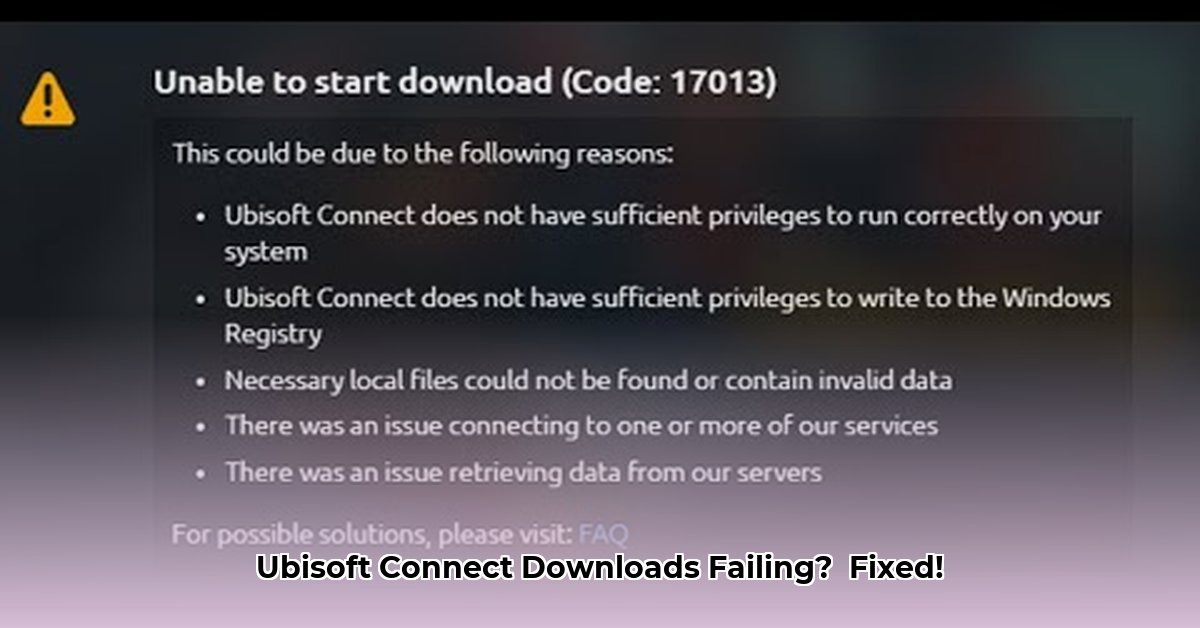
Getting that dreaded Ubisoft Connect download error is frustrating. This guide provides actionable steps to resolve common download issues, from simple connection checks to more advanced troubleshooting. Let's get you back to gaming!
1. Internet Connection Checkup: The Foundation
A faulty internet connection is the most frequent cause of Ubisoft Connect download failures. Before advanced troubleshooting, verify your connection's stability and speed.
Check Wi-Fi Signal Strength: A weak signal significantly impacts download speed. Move closer to your router or use a wired Ethernet connection for a more stable connection. (Wired connections generally offer better performance.)
Run a Speed Test: Use a free online speed test (many are available) to measure your download speed. Compare this to your internet plan's advertised speed. A significant discrepancy indicates a connectivity problem.
Restart Your Modem and Router: Unplug both devices from power, wait 30 seconds, plug the modem back in, wait for it to fully power up, and then plug in your router. This often resolves temporary connection issues. (This simple step resolves many network problems.)
2. Firewall and Antivirus Interference: Security vs. Downloads
Security software sometimes mistakenly blocks Ubisoft Connect. Temporarily disable or adjust your settings to allow Ubisoft Connect to download:
Temporarily Disable (Cautiously!): Temporarily disable your firewall and antivirus software only to test if they are the cause. Remember to re-enable them immediately afterward to protect your system.
Add Ubisoft Connect to Exceptions: Instead of disabling completely, add Ubisoft Connect to your firewall and antivirus exceptions lists. This allows Ubisoft Connect to function normally while maintaining security. (Consult your software's documentation for specific instructions.)
3. User Permissions: Administrator Access
Insufficient user permissions can prevent downloads. Ensure you have administrator access:
- Administrator Account Login: If you're not logged in as an administrator, try logging in with an administrator account. (Administrator accounts have full system permissions.)
4. Repairing or Reinstalling Ubisoft Connect: A Fresh Start
A corrupt Ubisoft Connect installation can cause download errors. Try these solutions:
Repair Ubisoft Connect: Ubisoft Connect often has a built-in repair function within its settings. Use this option before a full reinstall.
Reinstall Ubisoft Connect: If repairing fails, uninstall Ubisoft Connect completely and reinstall from the official Ubisoft website. (Remember to back up any saved game files before uninstalling.)
5. Ubisoft Server Status: Is It on Their End?
Server-side issues can prevent downloads. Check Ubisoft's server status:
- Check the Ubisoft Website: Visit the official Ubisoft support website or social media to check for server outages or maintenance announcements. (Server issues are beyond your control.)
6. Advanced Troubleshooting (For Experienced Users)
If prior steps fail, try these advanced techniques (proceed with caution):
Check Ubisoft Connect Logs: Ubisoft Connect logs may contain error messages that pinpoint the issue. (These logs require technical expertise to interpret.)
System File Checker (SFC): Run the Windows System File Checker (SFC /scannow) to detect and repair corrupted system files. (This tool scans for and repairs critical system files.)
Review DNS Settings: Incorrect DNS settings can prevent connection to Ubisoft's servers. You might try temporarily using a public DNS server like Google Public DNS (8.8.8.8 and 8.8.4.4). (Incorrect DNS settings hinder internet connectivity.)
7. Contacting Ubisoft Support: Seeking Expert Help
If all else fails, contact Ubisoft support. They have specialized tools and can diagnose more complex problems.
Troubleshooting Summary Table
| Step | Description | Potential Outcome |
|---|---|---|
| Internet Connection | Check Wi-Fi, run speed test, restart modem/router. | Improved connection; download resumes. |
| Firewall/Antivirus | Disable (temporarily) or add Ubisoft Connect to exceptions. | Downloads resume; security maintained. |
| User Permissions | Verify administrator access. | Download permissions granted. |
| Repair/Reinstall Ubisoft Connect | Repair or reinstall Ubisoft Connect. | Corrupted files replaced; application functions correctly. |
| Check Ubisoft Servers | Check Ubisoft's website for server status. | Identify server-side issues. |
| Advanced Troubleshooting | Check logs, run SFC, review DNS settings. | Identify and resolve deeper system problems. |
| Contact Ubisoft Support | Contact Ubisoft support for assistance. | Receive personalized support. |
Remember, patience is key. Work through these steps systematically, and you'll likely resolve your Ubisoft Connect download issues.
⭐⭐⭐⭐☆ (4.8)
Download via Link 1
Download via Link 2
Last updated: Thursday, May 01, 2025